
... and why MSE beats WebRTC for security cameras.
The best debugging sessions start with "this works, but it could be better." You're not fixing a broken thing – you're chasing quality, which means you get to be picky. This is the story of one such session: upgrading the live video stream on my Frigate NVR from jsmpeg (the old, CPU-hungry default) to something modern, in the course of a single evening.
It also turned into a minor lesson about how "better" and "best" are sometimes the same word and sometimes very much not.
The starting point
Frigate is an open-source NVR (network video recorder) that runs in a Docker container, pulls RTSP streams from IP cameras, does motion detection and object recognition (optionally with Coral TPU hardware acceleration), and records footage. It also has a web UI for viewing live streams and browsing recordings. The web UI is where the streaming choice matters.
By default, Frigate's web UI uses jsmpeg for the live view. jsmpeg is a JavaScript MPEG-1 decoder that runs entirely in the browser – the server sends raw MPEG-1 frames over a WebSocket, the client decodes them with pure JS, and they're rendered to a canvas element. It works everywhere, requires no modern browser features, and has terrible efficiency. The server has to re-encode every frame on the fly, the network has to carry MPEG-1 (which is less efficient than modern codecs), and the client has to decode it with a JavaScript codec running on the main thread.
The alternatives for modern browser streaming are:
- MSE (Media Source Extensions) – hand H.264 streams directly to the browser's native video decoder over an HTTP/WebSocket transport. The browser decodes H.264 natively (often with hardware acceleration), which is dramatically cheaper than JS-based decoding. Typical latency: 250-500ms.
- WebRTC – real-time peer-to-peer video using a UDP-based transport (with STUN/ICE negotiation). Sub-100ms latency is achievable. Designed for two-way video calls, but works for one-way streaming too.
jsmpeg sits at maybe 1-2 seconds of latency and uses way more client CPU than either alternative. MSE was the obvious next step. WebRTC was the theoretical ideal.
The plan: enable go2rtc, an RTSP-to-everything restreamer that's bundled with Frigate 0.13+, and switch the UI from jsmpeg to whatever go2rtc offers. Easy, right?
Configuring go2rtc (the easy part)
The Frigate config for go2rtc is refreshingly simple. Define your streams once at the top, and Frigate's UI auto-detects the new streaming option:
go2rtc:
  streams:
    camera: rtsp://user:[email protected]:8554/stream1
    camera_sub: rtsp://user:[email protected]:8554/stream2
  webrtc:
    candidates:
      - 10.0.18.222:8555

cameras:
  camera:
    ffmpeg:
      inputs:
        - path: rtsp://127.0.0.1:8554/camera_sub
          roles: [detect]
        - path: rtsp://127.0.0.1:8554/camera
          roles: [record]
Two streams from the same camera – high-res for recording, low-res for motion detection – both pulled once by go2rtc, then fanned out internally to Frigate's detection and recording pipelines via the loopback RTSP server at 127.0.0.1:8554. The camera only has to handle one RTSP connection instead of three; Frigate benefits from a single stream source.
The webrtc.candidates section tells go2rtc which IP to advertise to browsers for the WebRTC direct connection. This matters – WebRTC uses ICE candidates to negotiate the connection, and if the advertised candidate is unreachable, the browser silently falls back to MSE.
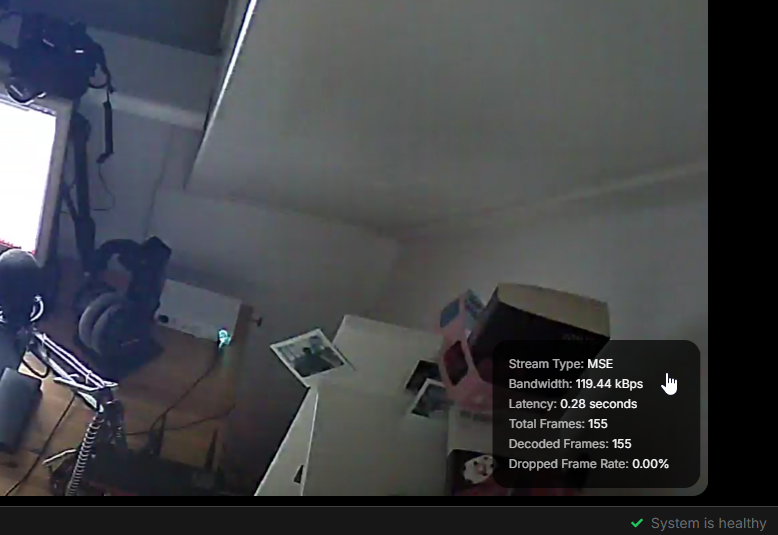
After restarting Frigate, the web UI showed a shiny new stat overlay: MSE, 0.25s latency, 26 kBps. A clean improvement over jsmpeg, which I'd estimate was at around 2-3 Mbps of unnecessarily-re-encoded MPEG-1. Better picture, lower latency, negligible CPU. Good.
But it said "MSE" where I expected "WebRTC". Time to figure out why.
The WebRTC rabbit hole
MSE working but WebRTC falling back is a specific failure mode: the browser tried to negotiate WebRTC first (because it's theoretically better), failed somewhere in the negotiation, and silently fell back to MSE. The go2rtc logs should tell you where it failed. Or, better, there's a direct debugging URL: http://10.0.18.222:1984/stream.html?src=cameraopens go2rtc's own test page with explicit protocol selection.
I opened the test page, selected WebRTC, and got a black video panel with no error. Signaling worked – the browser and go2rtc could talk HTTP to each other and exchange SDP descriptions – but the actual video data, which flows over UDP once the connection is established, never arrived.
The cause, after some poking: Docker bridge networking doesn't forward UDP properly for WebRTC's ephemeral port negotiation. When the browser and go2rtc negotiate a WebRTC connection, they establish a UDP path over some port in the 8555 range. With a Docker bridge network, the port 8555 TCP side was mapped correctly (that's what the compose file said: 8555:8555/tcp), but the UDP side wasn't. I had missed the UDP mapping entirely:
ports:
  - "8555:8555/tcp"
  - "8555:8555/udp"   # this was missing
Adding the UDP mapping got the TCP side of the negotiation working but didn't fully fix WebRTC, because bridge networking still messes with the UDP path at the connection-tracking layer. The cleanest fix was to switch Frigate to network_mode: host, which puts the container directly on the host's network stack with no NAT and no bridge. Every port on the host is directly reachable; WebRTC negotiates without any interference.
After the switch, the go2rtc test page showed a live video panel next to the "RTC" label. WebRTC was working.
But Frigate's own web UI was still showing MSE.
The second rabbit hole
If go2rtc served WebRTC directly, why wasn't Frigate's UI – which uses the same go2rtc backend – also using WebRTC?
The answer turned out to be about origins and mixed content. Frigate's UI is served over HTTPS through Traefik at https://frigate.node.hexie.dev. When it tries to initiate a WebRTC connection, the browser applies its mixed-content security rules: an HTTPS page can't directly talk to an HTTP backend or make non-secure network calls. go2rtc's WebRTC negotiation from a secure-origin page to an insecure backend was being blocked.
This is the kind of problem that has solutions (serve go2rtc over HTTPS too, configure a TURN server, etc.) but also has a more important question: do I actually need WebRTC for a security camera?
The advantage of WebRTC over MSE is sub-100ms latency. That's meaningful for two-way video calls, gaming streams, and interactive applications. For a security camera where the use case is "glance at the hallway occasionally to see if the cat is on the couch," the difference between 80ms and 250ms is completely invisible. Nobody can tell the difference at a glance. And the MSE version was already showing the stream at 0.25s latency with 26 kBps bandwidth – the picture was crisp, the video was smooth, the CPU was idle.
MSE was already good enough, and the complexity cost of making WebRTC work end-to-end wasn't justified. So I stopped fighting it and declared the upgrade done.
The ONVIF tangent worth mentioning
Midway through this, I hit an unrelated error: Frigate was throwing ONVIF connection errors every few seconds. It was trying to reach my camera at 192.168.88.251:2020, which wasn't the address I'd configured – I'd set it to 10.0.18.40.
The cause was a classic NAT traversal problem. My camera lives on a separate subnet (192.168.88.0/24) behind a MikroTik router, and it reaches the main network through dstnat rules. When Frigate connects to the camera's ONVIF endpoint (for features like PTZ control and camera discovery), the camera responds with its own self-reported address – which is 192.168.88.251, its internal IP. Frigate then tries to contact that address directly, which goes nowhere because the address isn't routable from Frigate's network.
ONVIF is a discovery protocol that assumes the discoverer can reach any address the discovered device advertises. Across NAT, that assumption breaks. There's no Frigate-side fix; the camera has to advertise an IP that's actually reachable. Some cameras let you configure a "fixed ONVIF host"; most don't. My Tapo doesn't.
The fix was simple: remove the ONVIF block entirely. I don't have a PTZ camera and I don't need pan/tilt/zoom controls from Frigate. ONVIF was doing nothing except generating log noise. RTSP works fine across the NAT (because the dstnat rule routes the TCP traffic correctly), and RTSP is all Frigate actually needs for recording and detection.
The lesson: ONVIF is often optional. If you don't use PTZ controls or don't care about ONVIF-based discovery, disabling it saves you from NAT-traversal problems and unnecessary log spam.
The fun-with-streaming bonus round
Once RTSP was working cleanly through go2rtc's restreamer, I realized I could point anything at the go2rtc RTSP endpoint and get my camera feed. Including OBS. Including Discord, if you pipe OBS through Discord's webcam source.
So I set it up. OBS Media Source with rtsp://10.0.18.222:8554/camera, set OBS as my "webcam" in Discord, and joined a call. The result was exactly as cursed as it sounds: an IR-night-vision ceiling-mounted view of a hallway, shown to my friends as my face. They did not enjoy this, which was the intended effect.
The technical detail worth knowing: OBS defaults to UDP transport for RTSP, which sometimes fails on go2rtc's TCP-preferring endpoint. The fix is to set the Input Format field in the OBS Media Source to rtsp_flags=prefer_tcp. This forces the RTSP connection to use TCP matching what go2rtc serves, and the black-screen problem goes away.
This is the stupidest application of real infrastructure I've built this year, and it is approximately my favorite thing about the whole project.
The technical takeaways
Setting aside the Discord chaos, here's what I carried out of this evening that applies to real work:
- jsmpeg is almost never the right choice anymore. It's an old fallback that made sense in 2015 when browser video support was spottier. On any modern browser, MSE is dramatically more efficient and works across every major platform. If you're running a system that still uses jsmpeg-based live streaming (older Home Assistant camera integrations, some legacy NVRs), upgrading is almost always a win.
- WebRTC is overkill for surveillance. It's the right tool for two-way calls, real-time gaming, and anything with sub-100ms latency requirements. For one-way security footage viewing, MSE is enough, and the additional complexity of getting WebRTC to work through HTTPS proxies, NAT, and mixed-content restrictions isn't worth the invisible latency improvement.
- Docker bridge networking and UDP don't mix well. For any service that does heavy UDP (WebRTC, VoIP, game servers, real-time audio),
network_mode: hostis often the path of least resistance, at the cost of losing Docker's network isolation. Weigh the tradeoff per service. - ONVIF is often the first thing to disable when debugging camera issues. It's rarely load-bearing and frequently the source of confusing errors, especially across NAT boundaries. If you don't use PTZ or ONVIF-based camera discovery, removing it simplifies things.
What I'd do differently
I'd start by asking "what latency do I actually need?" before chasing the best-looking option. The whole WebRTC rabbit hole was a response to a stat overlay showing "MSE" instead of the protocol I assumed was better – not a response to any actual problem I was experiencing. Half an hour of "why isn't this WebRTC" was half an hour I could have spent doing literally anything else, and the end state would have been identical.
This is a general lesson about infrastructure work that I think translates directly to client engagements: define "good enough" before you start optimizing, or you'll optimize past it without noticing. For a security camera, "good enough" is around 500ms latency and no dropped frames. For a video call, "good enough" is 100ms. For a training video player, "good enough" is two seconds and buffering is acceptable. Knowing the number before you start lets you stop when you hit it, instead of chasing diminishing returns.
Tech stack
Frigate 0.17, go2rtc (bundled with Frigate), RTSP from a Tapo camera over MikroTik NAT, Docker with network_mode: host, Traefik for HTTPS termination. Browser playback via MSE. Bonus stupidity via OBS Media Source feeding Discord's webcam input. Configs in the lab repo.
The takeaway for client work
Video infrastructure is a surprisingly common ask for SMBs – internal tutorial videos, customer-facing demos, security cameras at a physical office, training systems for staff, live-stream integration for events. Most teams don't have anyone with strong video pipeline experience, which means the work often falls on whoever touches infrastructure in general.
The tools in this post (Frigate, go2rtc, RTSP, MSE streaming) transfer directly to business contexts – Frigate is a serious NVR that scales to dozens of cameras, and go2rtc is production-grade restreamer software used in commercial products. The debugging skills transfer even more directly: Docker networking quirks, NAT traversal, HTTPS mixed content, choosing the right protocol for the actual requirement.
If your team needs help with self-hosted video infrastructure, RTSP-based camera integration, or any "we have this feed and need to do something with it" pipeline – that's the kind of problem I enjoy.